WeatherGuide: Forecast & Radar
- 4.7
- Rating
- 10.00K
- Installs
- Free
- Price
 Analysis by App-foxy
I like weather apps that help me make a decision rather than simply show me a wall of numbers. WeatherGuide: Forecast & Radar is built around that practical idea: should I take an umbrella, add a jacket, or leave home as I am? It sits in the weather category, comes from MacroSmart Tech, and is free to use, which makes it easy to try without turning the first forecast into a commitment.
After spending time with it, my impression is that its strongest appeal is not novelty for its own sake. It is the attempt to turn forecast information into an out-the-door answer, while still keeping radar and AI in the picture. That combination can be useful when I am rushing, but it also means I need to treat the app’s guidance as assistance rather than a guarantee. Weather changes, local conditions vary, and a short recommendation can hide the uncertainty behind it.
How WeatherGuide earns trust before I rely on it
The app has a 4.7 average from around 420 ratings, with over 10 thousand installs. Those figures suggest that it has found an audience, although I would not treat popularity as proof that every forecast will be right for every neighborhood. Weather apps are judged most honestly in the places and routines where people use them, so I still compare its advice with what I can see outside when conditions look unsettled.
You May Also Like

 Pandora - Music & Podcasts
Pandora’s Music Is Easy to Start, but Harder to Recover
Pandora’s strength is its low-effort path from a seed to a station. Its weak spot is how much confidence it asks you to place in connection, setup, and quiet recovery.

 AccuWeather: Weather Radar
AccuWeather Review: A Quick, Clear Forecast for Everyday Decisions
For everyday plans, the best forecast is the one you can understand quickly. AccuWeather makes rain timing, radar, and local conditions easy to act on, with a few trade-offs.

 Hill Climb Racing
Why Hill Climb Racing Still Turns Crashes Into One More Run
A tiny car, a bumpy hill and one more upgrade: Hill Climb Racing keeps resurfacing because its simple chaos makes every near-miss feel personal.

 AliExpress - Shopping App
AliExpress Makes Global Shopping Feel Personal, but Shoppers Bear the Risk
AliExpress turns a global marketplace into a pocket-sized discovery engine. Its reach is useful, its shopping loop compelling, and its trade-offs easy to miss.

 Lords Mobile: Kingdom Wars
Lords Mobile Is a Kingdom-Building Routine, Not a Quick Match
A case-by-case verdict on the building, battles, device demands, and social commitments that make Lords Mobile rewarding for some players and exhausting for others.

 PDF Scanner app - TapScanner
TapScanner Makes Paperwork Easier to Capture, Check, and Share
TapScanner makes scanning with a phone feel less like a rescue operation and more like a dependable step in getting work done. Its capture tools are useful, though not flawless.
More From Our News Desk
View All News


It is marked for Everyone and is currently on version 1.1.2, with support beginning at Android 9. That is a useful practical detail for anyone using an older phone: the app does not require a recent Android release simply to get started. Its free price also lowers the risk of testing it alongside a familiar weather service instead of replacing that service immediately.
I pay attention to trust in a weather app because the information can influence travel, clothing, outdoor work, and timing. In this case, the sensible approach is to examine the choices the app visibly presents rather than assume that AI automatically makes the forecast more reliable. A polished recommendation is convenient, but convenience should not make me ignore the underlying radar view or the normal signs of changing weather.
The developer, MacroSmart Tech, presents a focused weather tool rather than a broad lifestyle platform. That focus is welcome. I would rather have a clear route from opening the app to understanding the next few hours than navigate unrelated content. At the same time, a focused interface has to make its controls obvious. If I cannot tell why a recommendation was made or where it came from, the simple wording becomes less reassuring.
What the radar adds to a quick recommendation
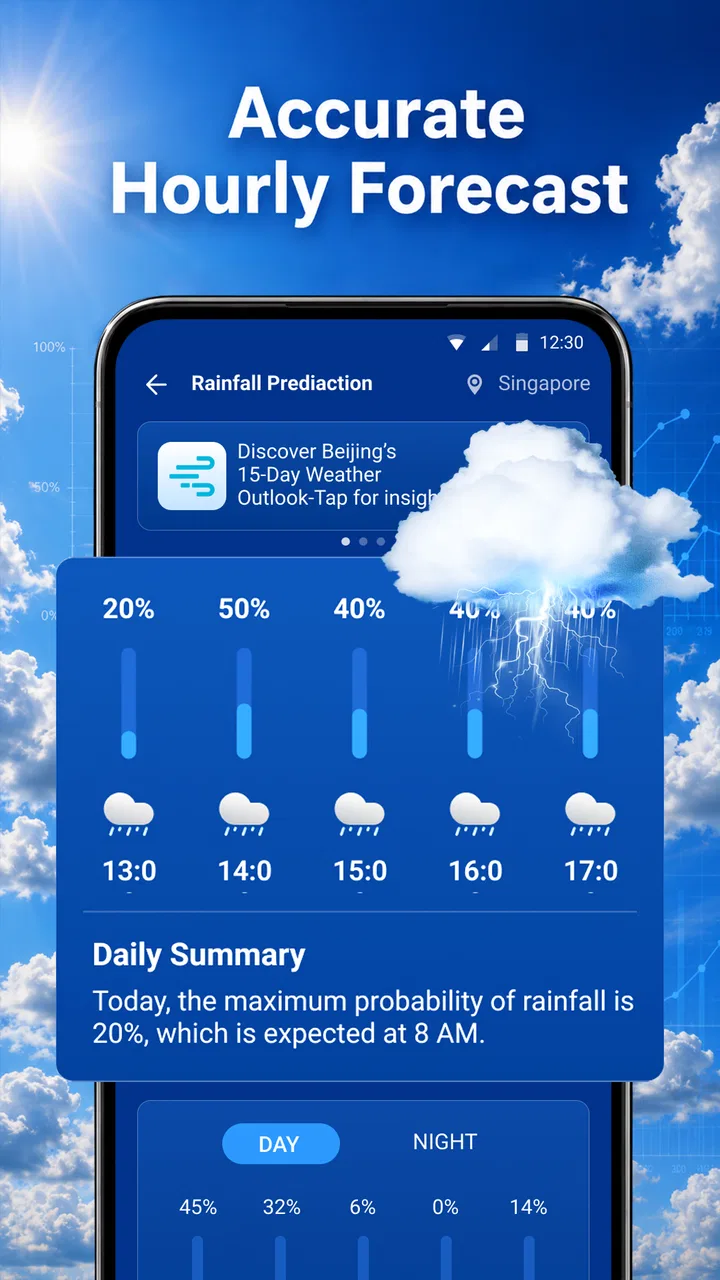
Radar is the part I would use when the sky is borderline. A basic forecast may tell me that rain is possible, but radar can help me judge whether the situation looks like a passing shower, a wider band of precipitation, or something moving toward my route. That distinction matters more than a generic rain icon when I am deciding whether to walk, cycle, or wait.
My practical tip is to check the radar before leaving and then check it again if the journey is long enough for conditions to change. I would not stare at it continuously, because that creates the illusion of precision. Instead, I use it as a visual cross-check: first read the app’s plain-language suggestion, then look at the radar to see whether the movement supports that suggestion.
This is also where WeatherGuide may suit a hurried user better than a traditional forecast screen. Someone who does not want to interpret several hourly rows can begin with the clothing or umbrella question and only open the radar when the decision feels uncertain. That layered workflow is more useful than forcing every user to study meteorological details before getting a simple answer.
Where the AI wording helps, and where I stay cautious
The AI element is appealing because it can translate weather information into everyday language. I find that especially helpful when the forecast contains several competing signals, such as mild temperatures, wind, and a chance of rain. A short explanation can make the situation easier to act on than a collection of symbols.
Still, I would not use an AI recommendation as the only basis for a safety-critical decision. For a casual walk, it can save time. For a long hike, a commute with no shelter, or outdoor work where exposure matters, I would inspect the forecast and radar more carefully and use appropriate judgment. The trade-off is clear: the app’s conversational guidance reduces effort, but reducing effort can also reduce the amount of detail I personally review.
A useful habit is to ask whether the recommendation matches the consequence of being wrong. If being underdressed is merely uncomfortable, the quick answer may be enough. If rain would damage equipment, disrupt a trip, or create a safety concern, I would use WeatherGuide as one input and allow extra time for checking conditions. That is not a criticism unique to this app; it is the sensible limit of simplified weather advice.
Controls, privacy choices, and moments that deserve attention
When I review an app through a trust lens, I separate visible user control from assumptions. I do not regard the presence of radar or AI as evidence of a particular data practice, and I would not infer anything about permissions, account requirements, retention, or sharing unless the app clearly explains those points in its own screens and settings. The right approach is to read the permission prompts and privacy choices during setup instead of accepting them automatically.
That matters especially for a weather app because location can make the experience convenient while also being sensitive. If WeatherGuide asks to use location, I would consider whether the benefit is worth granting it continuously, and I would look for the operating system’s available choices, such as allowing access only when needed or entering a place manually if that option is offered. I would make the decision from the actual prompt, not from the fact that the app belongs to the weather category.
The same caution applies to notifications. Forecast alerts can be useful before a commute or outdoor plan, but too many alerts quickly become noise. I would enable only the notices that solve a real problem for me, then revisit them after a few days. A good weather tool should fit my routine rather than compete with every other notification on the phone.
Account controls deserve the same attention. If the app offers sign-in, I would first ask what I gain from creating an account and whether the core forecast experience works without one. If it offers a guest path, that would be my starting point. I would also check whether settings such as saved locations, alerts, or personalization are clearly separated, because that makes it easier to understand what I am choosing.
These are not features I can responsibly invent or promise on the app’s behalf. They are the checks I would make while using it. The most trustworthy choice is the one I can see, understand, and change, whether that concerns location, alerts, account access, or any other request shown during use.
A realistic morning with the app
Imagine I am leaving for work on foot and have only a few minutes. I open WeatherGuide, read the immediate recommendation, and use that as my first answer instead of scanning an entire forecast. If the suggestion says a jacket is sensible, I can act quickly. If rain looks possible, I open radar and check whether the precipitation appears close to my route or is moving away.
Before stepping outside, I compare the recommendation with the actual conditions. If the wind is stronger than expected or the sky already looks dark, I choose the more cautious option. On the return journey, I would check again rather than assume the morning view still applies. This workflow uses the app’s convenience without pretending that one glance can cover an entire day.
For a parent preparing a child for school, the same process can be useful, but I would pay attention to the difference between comfort and protection. A simple jacket suggestion may be enough for a short walk, while a day involving outdoor activities may justify checking several time periods and radar movement. The app helps reduce the first decision; it does not remove the need to think about the full schedule.
Who will appreciate it most
I think WeatherGuide is best for people who want a fast, practical weather check and do not enjoy interpreting dense forecast layouts. Commuters, casual walkers, students, and anyone who regularly asks whether to carry an umbrella can benefit from its decision-oriented presentation. The free price makes it particularly easy to keep it installed for a trial period and compare its advice with the weather outside.
It may also work well for users who want a middle ground between a minimal weather widget and a detailed meteorological dashboard. The recommendation gives a quick starting point, while radar offers a way to investigate when the answer is not obvious. That combination is more flexible than an app that provides only a temperature and a single weather icon.
I would be less enthusiastic about using it as my only tool for serious outdoor planning. Hikers, sailors, event organizers, and workers exposed to changing conditions usually need more detailed information, longer-range planning, and a clear understanding of uncertainty. If my decision has meaningful safety or financial consequences, I prefer to consult additional sources and avoid relying on a short AI-generated interpretation alone.
How it compares with familiar weather alternatives
Compared with the default weather service on a phone, WeatherGuide’s main difference is its emphasis on an actionable answer. A built-in app may be quicker to open and may already know my preferred locations, but it can leave me to interpret the forecast myself. WeatherGuide is more appealing when I want the app to frame the decision in ordinary language.
Compared with a radar-first service, it takes the opposite starting point. A radar-focused app can be better when I need to follow a storm’s movement closely, but it may feel excessive for deciding what to wear. WeatherGuide’s advantage is the shorter path from forecast to action; the trade-off is that I may need to inspect the radar myself when the situation becomes complicated.
Compared with a widget-only tool, it offers more room for context through its radar and AI approach. A widget wins for glanceability, especially when I am already on the home screen, while WeatherGuide makes more sense when I am willing to open an app and make a deliberate check. I would choose between them based on routine: instant visibility for repetitive checks, or guided interpretation when the weather is uncertain.
Small habits that make the experience more reliable
First, I would set up the app around the places I actually visit rather than treating one location as representative of every journey. A forecast that is useful at home may not describe conditions several miles away, especially around open areas, hills, or the coast. I would verify the selected location before trusting a recommendation.
Second, I would use radar selectively. Looking at it is most valuable when rain timing affects a decision, not when the forecast is stable and the sky is clear. This keeps the feature practical and prevents me from mistaking a moving visual layer for an exact promise about my doorstep.
Third, I would test the notification settings against my real schedule. I prefer alerts that arrive early enough to change my plan, not messages that simply repeat information I already saw. If the app’s alerts do not improve my decisions, I would turn them down and keep the app for manual checks.
Finally, I would treat the AI wording as a summary that I can challenge. If its suggestion feels too confident, I look at the underlying forecast signals and current conditions. That habit is the difference between using the app intelligently and handing over the decision completely.
My cautious verdict
WeatherGuide: Forecast & Radar is a promising free weather app for everyday decisions. I like the focus on answering the question people commonly have before leaving home, and I appreciate that radar gives me a way to look beyond the quick recommendation. The 4.7 average and growing install base make it worth considering, but they do not replace my own testing in the locations and weather patterns that matter to me.
My recommendation is strongest for casual, time-pressed users who want a clear starting point and are willing to check the details when conditions are uncertain. I would install it for commuting, errands, and ordinary outdoor plans, then adjust location, notification, and privacy choices carefully during setup. I would skip making it my sole source for high-stakes weather decisions or situations where detailed forecasting is more important than convenience.
The app’s real value is its balance between simplicity and optional depth. It can give me a quick answer, but it also encourages a second look through radar when I need one. If MacroSmart Tech keeps that balance clear and gives users understandable control over the information and alerts they choose to share, the app has a useful place on an Android phone. For now, I see it as a practical companion rather than an unquestionable authority—and that is exactly how I would recommend using it.
FAQs for WeatherGuide: Forecast & Radar
01What is WeatherGuide: Forecast & Radar used for?
WeatherGuide: Forecast & Radar is designed to help you check current conditions, hourly changes, and upcoming forecasts in one place. It may also provide radar-style weather views, temperature details, precipitation information, wind data, and other useful indicators. The app is helpful for planning commutes, outdoor activities, trips, and daily routines, although forecasts should always be treated as estimates rather than guarantees.
02Does WeatherGuide: Forecast & Radar provide accurate weather information?
The app presents weather information based on available meteorological data and forecasting services, so its accuracy can vary depending on your location, the weather provider, and how far ahead you are checking. Short-term forecasts are generally more dependable than long-range predictions. For severe weather, travel, or safety decisions, it is sensible to compare the information with official local weather warnings.
03Does the app require location access to work?
WeatherGuide: Forecast & Radar can typically use your device location to display weather for your current area, which makes checking local conditions more convenient. However, users who prefer greater privacy may be able to search for and save locations manually instead. Before accepting permission requests, review the app’s settings and your device privacy controls so you understand when location access is being used.
04Is WeatherGuide: Forecast & Radar free to download and use?
The app may be available as a free download, but some features can depend on the version installed, advertising, subscriptions, or optional in-app purchases. Premium tools might include an ad-free experience, expanded forecast details, additional radar options, or extra customization. Check the Google Play Store or Apple App Store listing for the current pricing, trial conditions, and subscription cancellation information.
05Can WeatherGuide: Forecast & Radar send weather alerts and notifications?
Depending on the platform and the features enabled in your version, WeatherGuide: Forecast & Radar may offer notifications for forecast changes, rain, storms, or other weather events. Notifications usually require permission and may need to be configured manually inside the app. Because alert availability can differ by country and data provider, do not rely on the app alone for official emergency or severe-weather warnings.
Pros
- Clear hourly and daily forecasts for planning ahead.
- Radar maps help track approaching rain and storms.
- Useful weather details include wind
- humidity
- and visibility.
- Clean interface makes key conditions easy to find.
- Location support provides forecasts for travel and multiple places.
Cons
- Some advanced forecast features may require a subscription.
- Radar coverage and accuracy can vary by region.
- Frequent alerts may feel excessive without careful customization.
- Weather data can occasionally differ from local conditions.
- The app may use significant battery with location and alerts enabled.

WeatherGuide: Forecast & Radar
Gallery